
AI for Small Business: Increase Sales with AI (2026 Guide)
Nowadays, everyone is hearing about AI, but the real question is:
“How to actually use AI in a small business?”
Many business owners feel confused because they think using AI requires technical knowledge or a high budget. The reality is that you can make your business smarter using simple tools.
In this guide, you will find practical, real-world use cases through which you can:
- increase your sales
- save time
- automate repetitive tasks
What is AI for Small Business?
In simple terms:
By using AI, you can make your business’s repetitive and time-consuming tasks faster and smarter.
With this, you can:
- reply to customer messages quickly
- create social media content
- manage leads
- automate emails and follow-ups
👉 The goal is simple:
More results with less effort
Step 1: Identify Your Business Problem
First, don’t look for tools ❌
Understand the problem first ✅
Common problems:
- late replies to customer messages
- missing leads
- stress of creating social media content
- manual data entry
👉 Your target should be:
“Which task am I doing again and again?”
Step 2: Use the Right AI Tools
You don’t need complicated tools. These simple tools are enough:
- ChatGPT → messages, content, replies
- Canva → design and social posts
- Google Sheets → for managing data
- Email tools → follow-up system
👉 Start small, then scale
Step 3: Real-World Example (IMPORTANT)
Example: Local Clothing Shop
Problem:
- Customers send messages on Instagram DM
- Replies are delayed
- Sales are missed
Solution with AI:
- List common questions
- Generate ready replies using ChatGPT
- Set up a quick reply system
- Track daily leads in Google Sheets
Result:
- faster replies
- more conversions
- better customer experience
👉 This simple system improves the business
Step 4: How to Increase Sales with AI
1. Fast Response System
👉 Faster replies to customers = higher chances of sales
2. Better Content
- write captions using AI
- create designs using Canva
3. Follow-Up Automation
- send follow-ups to interested customers
- use a reminder system
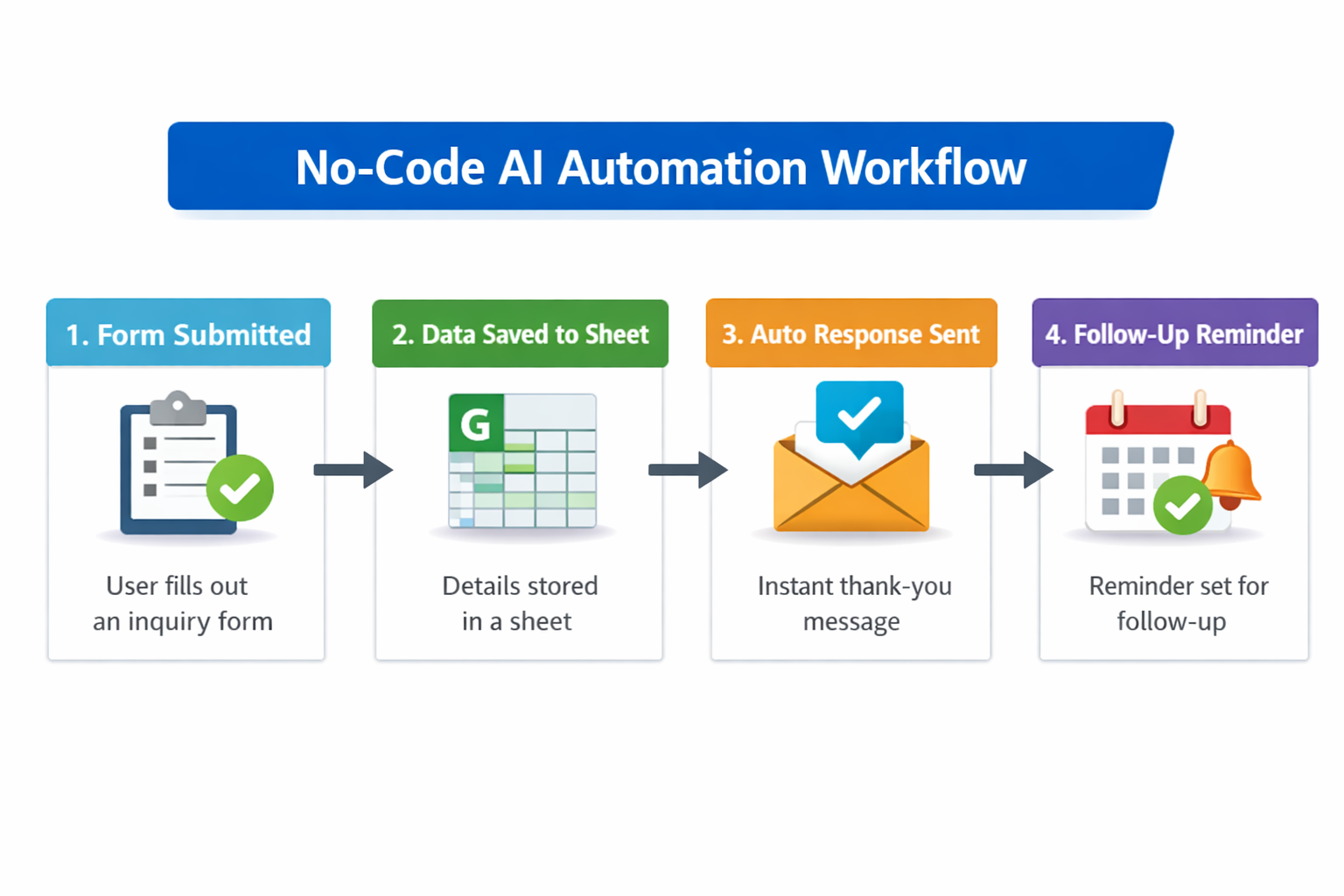
Step 5: Simple Workflow (Use this)
- Customer inquiry comes in
- AI-assisted reply is sent
- Data is saved in a sheet
- Follow-up reminder is set
👉 This system can be applied to any business
Step 6: Common Mistakes (Avoid these)
- ❌ Using too many tools
- ❌ Not practicing
- ❌ Creating overcomplicated systems
- ❌ Lack of consistency
Step 7: 7-Day Action Plan
Day 1–2:
- Identify the problem
Day 3–4:
- Set up tools
Day 5–6:
- Test the workflow
Day 7:
- Start real implementation
Conclusion
AI is not magic, but if used correctly:
- you will save time
- your sales will increase
- your business will become more organized
👉 Start small, but start today
Is AI useful for small businesses?
Yes, especially for automating repetitive tasks.
Do I need coding to use AI?
No, at a basic level you can start without coding.
Which businesses can use AI?
Almost any business where customer interaction exists.
Note
This guide is created for beginners with a focus on practical usage. You can directly apply it to your business.
1. AI Tools for Beginners
If you are just getting started, check out this complete guide on AI tools for beginners to understand which tools to use and how to use them effectively.
2. ChatGPT Guide You can also learn how to use ChatGPT for business to create replies, content, and automate daily tasks easily.
3. AI for Digital Marketing To grow faster, explore how AI for digital marketing can help you generate leads and improve your online presence. 4. AI Automation in Business If you want to scale operations, read about AI automation for business and how it reduces manual work. 5. No-Code AI Tools Beginners can start easily with no-code AI tools without any technical knowledge.
How to Start a Best No-Code AI Automation Business
Many people are reading about AI, but far fewer understand how to turn it into a service-based business. That is exactly why the opportunity is