AI Tools for Beginners: Best Free Tools to Start in 2026
Artificial Intelligence is no longer just for tech experts. In 2026, almost anyone — whether you are a student, freelancer, blogger, content creator, small business owner, or job seeker — can use AI tools to save time, create content faster, learn new skills, and automate everyday tasks.
The problem is that if you are just starting out, the world of AI can feel confusing.
You may be asking:
- Which AI tool is best for writing?
- Which one is free?
- Which one is easiest to use?
- Which one is safe and beginner-friendly?
- And most importantly, where should you start?
This guide is designed to answer all of those questions.
In this article, you will learn:
- what AI tools are
- why they matter in 2026
- the best free AI tools for beginners
- real-world examples of how to use them
- a step-by-step beginner workflow
- mistakes to avoid
- how to use AI in a way that is SEO-friendly, AdSense-safe, and copyright-safe
If you are completely new to AI, this is one of the best places to begin.
What Are AI Tools?
In simple terms, AI tools are software or apps that use artificial intelligence to help you complete tasks faster and more efficiently.
These tools can help you with things like:
- writing blog posts
- creating images
- generating video scripts
- fixing grammar mistakes
- designing social media posts
- coding websites or apps
- creating presentations
- writing emails
- doing research
- automating repetitive work
In many cases, a task that normally takes 2–3 hours can be done in 20–30 minutes with the right AI tool.
But one important thing to remember is this:
AI is not here to replace you. It is here to assist you.
The best results happen when you use AI as a helper, not as a shortcut.
Why Beginners Should Start Using AI in 2026
Learning how to use AI is becoming a practical skill, not just a trend.
Here’s why beginners should start now:
1. It saves time
AI can speed up writing, planning, research, editing, and idea generation.
2. It makes content creation easier
You can create blog posts, YouTube scripts, captions, thumbnails, product descriptions, and more.
3. It helps you learn faster
AI can explain complex topics in simple language, which is perfect for students and beginners.
4. It creates freelancing opportunities
Many people now earn by offering AI-assisted writing, design, editing, automation, and content creation services.
5. It helps small businesses grow
AI can support customer communication, marketing, content planning, and business productivity.
Anyone who learns to use AI properly in 2026 will have a real advantage.
How to Choose the Right AI Tool as a Beginner
Not every AI tool is useful for everyone.
The best way to choose the right tool is to first understand what you actually need help with.
Ask yourself these 5 questions:
- What do I want AI to help me with?
- Do I need a writing tool?
- Do I need a design or image tool?
- Do I need a coding or no-code tool?
- Do I want something free and easy to use?
If you are a beginner, the smartest strategy is:
Start with one tool per category instead of trying 10 tools at once.
That is exactly what this guide will help you do.
Best Free AI Tools for Beginners in 2026
Now let’s look at the best beginner-friendly AI tools you can start using right away.
These tools are useful, practical, and cover the most common beginner needs like writing, design, research, productivity, coding, and video creation.
1) ChatGPT – Best AI Tool for Writing, Ideas, Learning, and Productivity
If you only want to start with one AI tool, ChatGPT is one of the best choices.
It is useful for:
- blog post ideas
- article outlines
- YouTube scripts
- Instagram captions
- email writing
- content planning
- studying
- summaries
- business ideas
- productivity tasks
Why beginners like it
- easy to use
- simple chat-style interface
- works with natural language
- no technical knowledge required
Real-world example
Let’s say you want to write a blog post on:
“Best laptops for students in 2026”
Instead of starting from scratch, you can ask ChatGPT:
“Create a beginner-friendly blog outline for best laptops for students in 2026.”
It can help you with:
- headings
- article structure
- key points
- FAQs
- intro ideas
- SEO support
How to use ChatGPT step by step
Step 1: Create an accountStep 2: Write a clear promptStep 3: Review the output carefullyStep 4: Rewrite and personalize the contentStep 5: Edit before publishingBest beginner prompts
- “Explain SEO in simple language”
- “Create 10 blog post ideas for beginners”
- “Write a YouTube Shorts script about AI tools”
- “Give me a 30-day content plan”
- “Write an Instagram caption in simple English”
2) Canva AI – Best for Design, Thumbnails, Social Media, and Presentations
Canva is one of the easiest design tools for beginners, and its AI features make designing even faster.
You can use Canva AI to create:
- YouTube thumbnails
- Instagram posts
- Pinterest pins
- blog featured images
- logos
- quote posts
- presentations
- resumes
- reels covers
Why beginners love Canva
- drag-and-drop editor
- ready-made templates
- no design experience needed
- quick and simple workflow
Real-world example
If you run a blog or social media page, Canva can help you create:
- blog featured images
- Pinterest graphics
- post templates
- branded social content
Step-by-step beginner use
Step 1: Open Canva

Step 2: Choose a template

Step 3: Use AI writing/design tools if needed

Step 4: Customize text, icons, and layout

Step 5: Export and publish
Canva is especially useful if you want professional-looking content without hiring a designer.
3) Grammarly – Best for Grammar, Clarity, and Better Writing
Grammarly is perfect for beginners who want to improve their English writing.
It helps with:
- grammar mistakes
- spelling errors
- awkward phrasing
- sentence clarity
- professional tone
- readability
Real-world example
If you write blog posts, emails, website content, or social captions, Grammarly helps make your writing cleaner and easier to read.
Why it matters
Many beginners use AI to create content, but they skip the editing step.
That is where Grammarly becomes useful.
How to use it
Step 1: Install the browser extension

Step 2: Write your content

Step 3: Apply grammar and clarity suggestions

Step 4: Keep your natural voice

Step 5: Do one final manual read
4) Notion AI – Best for Notes, Planning, and Productivity
Notion is an all-in-one workspace that is excellent for staying organized.
It is useful for:
- content calendars
- study notes
- daily planning
- blog idea storage
- to-do lists
- project tracking
- script planning
Real-world example
A beginner content creator can use Notion to plan an entire month of content:
- Monday – blog writing
- Tuesday – Instagram content
- Wednesday – YouTube Shorts
- Thursday – research
- Friday – SEO updates
Why beginners should use it
Notion AI can help you:
- organize ideas
- summarize notes
- structure projects
- stay consistent
Step-by-step use
Step 1: Create a workspace

Step 2: Make a “Content Planner” page

Step 3: Add weekly or monthly goals

Step 4: Use AI to expand ideas

Step 5: Keep all your work in one place
5) Perplexity – Best for Research and Quick Answers
Perplexity is a useful AI-powered research tool for beginners who want fast, source-based answers.
It is helpful for:
- quick research
- summaries
- topic understanding
- comparisons
- finding current information
Real-world example
If you want to write an article on:
“Best free AI tools for students”
Perplexity can help you quickly gather:
- topic insights
- tool comparisons
- current ideas
- source-backed summaries
Why beginners like it
- combines search + AI answers
- easier than traditional research
- useful for understanding topics quickly
Important tip
Do not copy and paste research output directly into your blog.
Use it for:
- understanding
- note-taking
- comparison
- direction
Then rewrite everything in your own words.
6) Claude – Best for Long Writing and Clean Explanations
Claude is a strong option when you need:
- long-form writing
- detailed explanations
- article expansion
- content rewriting
- cleaner structure
Best beginner use cases
- long blog drafts
- script rewriting
- study explanations
- idea expansion
- deep article structure
Real-world example
If you need a 3,000-word article draft, Claude can help you generate a structured first version more smoothly.
Beginner tip
Use Claude when you want:
- detailed writing
- long explanations
- calm, clean output
Use ChatGPT when you want:
- quick ideas
- versatile tasks
- practical workflows
Both can work well together.
7) Google Gemini – Best for Google Users
Gemini is a useful AI tool for people who already use Google services like:
- Gmail
- Google Docs
- Google Drive
- Android
- Google Search
What it helps with
- quick writing support
- summaries
- explanations
- productivity tasks
- note simplification
Real-world example
If you are a student, Gemini can help you:
- summarize chapters
- simplify notes
- understand difficult concepts
- organize study material
Best for
Gemini is a good beginner choice if most of your work already happens inside the Google ecosystem.
8) GitHub Copilot – Best AI Tool for Beginner Coders
If you are learning coding, GitHub Copilot can be a helpful assistant.
It can help with:
- code suggestions
- function writing
- syntax help
- debugging ideas
- faster development
Real-world example
If you are building a simple website, Copilot can suggest:
- HTML sections
- CSS styling
- buttons
- forms
- basic JavaScript snippets
Important warning
Do not trust AI code blindly.
AI-generated code can sometimes be:
- buggy
- insecure
- inefficient
- unnecessary
So if you are a beginner, use it to learn and speed up, not to skip understanding.
9) CapCut AI – Best for Video Editing Beginners
CapCut is a great beginner tool if you create:
- YouTube Shorts
- Instagram Reels
- TikTok videos
- educational clips
- motivational edits
What it can help with
- auto captions
- subtitle timing
- text overlays
- transitions
- short-form editing
- templates
Real-world example
If you are creating a 15-second motivational or educational short, CapCut can help you quickly add:
- captions
- visual timing
- transitions
- hook text
It is especially useful for creators who want simple editing without complicated software.
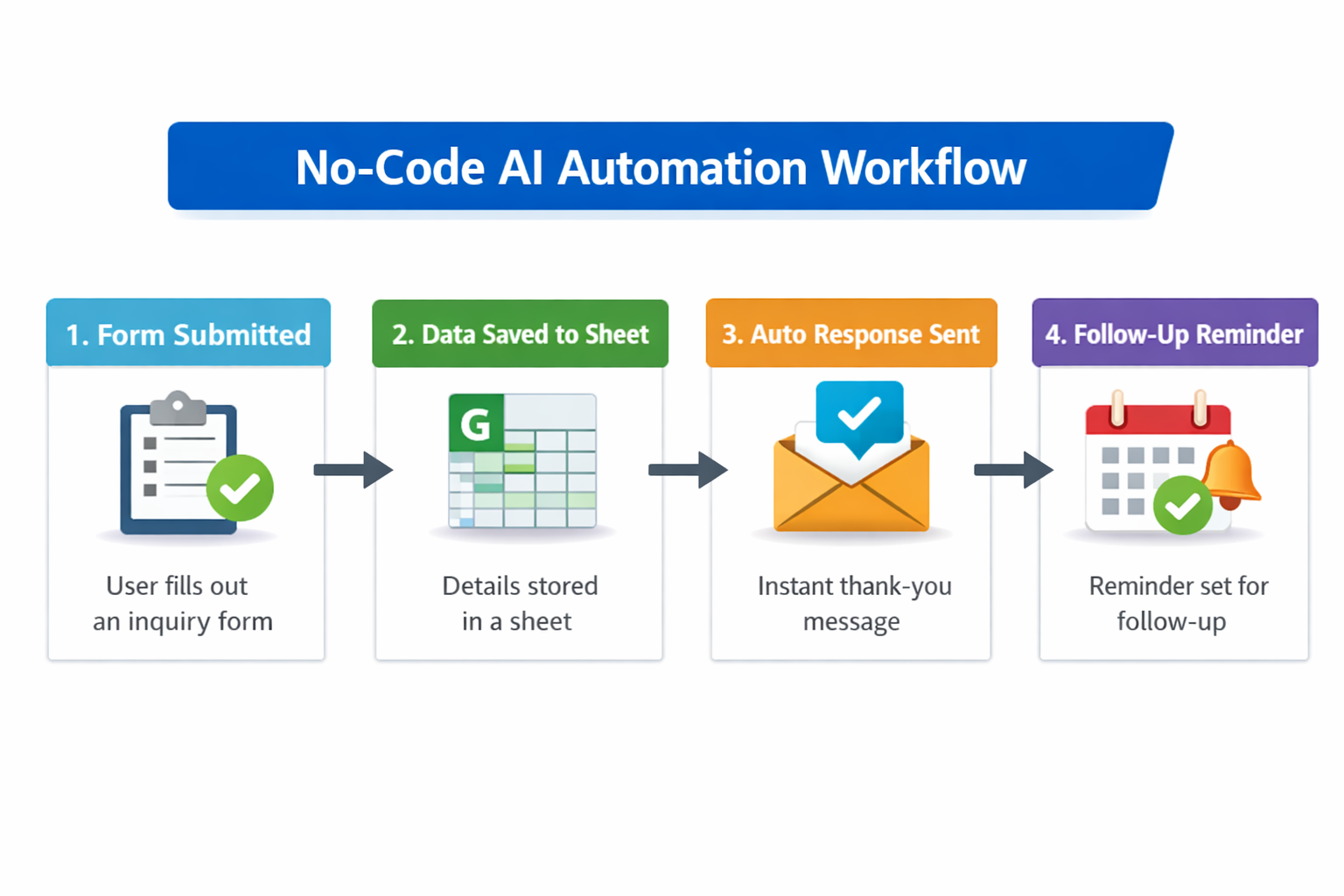
10) Zapier and No-Code AI Tools – Best for Automation Beginners
If you want to automate repetitive tasks, no-code AI tools are extremely useful.
These tools can help you automate:
- form submissions
- email alerts
- spreadsheet updates
- lead tracking
- task creation
- content workflows
Real-world example
Imagine someone fills out your website contact form.
You can automate:
- an email notification
- a Google Sheet entry
- a task in your planner
- a WhatsApp or team alert
Why this matters
Automation helps you:
- save time
- reduce manual work
- stay organized
- improve workflow
Best AI Tools by Use Case (Quick Guide)
If you are still confused about where to start, use this simple guide.
For Writing
For Research
For Design
For Videos
- CapCut AI
For Productivity
For Coding
For Automation
Step-by-Step: How Beginners Should Start Using AI
This is the most important part of the guide.
Many people get excited about AI tools but use them randomly.
That usually leads to weak results.
A better approach is to build a simple beginner workflow.
Step 1: Choose One Problem to Solve
First, ask yourself:
“What do I want AI to help me with?”
Examples:
- I want to write blog posts
- I want YouTube script ideas
- I want social media content
- I want logo or thumbnail design
- I want to automate work
- I want to study faster
Once your problem is clear, choosing the right AI tool becomes much easier.
Step 2: Start With One Tool Per Category
If you are a complete beginner, this simple starter stack is enough:
Beginner AI Starter Stack
- ChatGPT → for writing and ideas
- Canva → for design
- Grammarly → for editing
That alone is enough to make you more productive.
Step 3: Learn Prompting
The quality of your result depends heavily on the quality of your prompt.
Bad prompt
“Write blog”
Better prompt
“Write a beginner-friendly blog outline on the best free AI tools in 2026.”
Best prompt formula
Use this structure:
Role + Task + Topic + Audience + Style + Output Format
Example:
“Act as an SEO content writer and create a beginner-friendly blog outline on free AI tools for small business owners in 2026. Use simple English and include FAQs.”
This simple structure can improve your AI output dramatically.
Step 4: Treat AI Output as a First Draft
This is extremely important:
AI output is not your final article. It is your first draft.
Your job is to:
- rewrite
- personalize
- improve clarity
- add examples
- add real value
- edit the final result
That is what makes your content:
- unique
- useful
- SEO-friendly
- AdSense-safe
- worth reading
Step 5: Add Human Value
This is what separates good content from low-quality AI content.
To make your article stronger, add:
- real-world examples
- your personal observations
- practical advice
- mistakes to avoid
- screenshots (if possible)
- beginner tips
This is what makes content genuinely helpful.
Real-World Example: How a Beginner Can Use AI in One Day
Let’s say a beginner blogger wants to publish one SEO article.
Here is a simple workflow:
Step 1 – Topic Research
Use ChatGPT or Perplexity
Prompt:
“Give me beginner blog topic ideas about AI tools.”
Step 2 – Create an Outline
Use ChatGPT
Prompt:
“Create an SEO-friendly outline for an article on AI tools for beginners.”
Step 3 – Write the Draft
Use ChatGPT or Claude
Prompt:
“Write this article section by section in simple English.”
Step 4 – Edit the Content
Use Grammarly
Step 5 – Design the Featured Image
Use Canva
Step 6 – Publish
Upload the final post to WordPress
Step 7 – Promote It
Use ChatGPT again:
“Write a Pinterest title and Instagram caption for this blog post.”
This is a realistic and beginner-friendly AI workflow.
Common Mistakes Beginners Make With AI
Avoid these if you want better results.
1. Copy-pasting AI output directly
This often leads to generic, low-quality content.
2. Trying too many tools at once
This creates confusion and slows you down.
3. Writing vague prompts
Weak prompts usually create weak output.
4. Not fact-checking
AI can sometimes give outdated or incorrect information.
5. Not adding your own input
Without human editing, content feels flat and generic.
6. Ignoring SEO
Even good content may not rank if it is poorly structured.
7. Creating copyright risk
Copying competitors, duplicating content, or reusing material carelessly can cause problems.

AI for Small Business
Many business owners feel confused because they think using AI requires technical knowledge or a high budget. The reality is that you can make