
How to Start a No-Code AI Automation Business in 2026
Many people are reading about AI, but far fewer understand how to turn it into a service-based business. That is exactly why the opportunity is still open. Even if you do not know how to code, you can still start a no-code AI automation business.
This article is not just theory. It gives you a practical system. You will learn how to choose a niche, which tools to use, what type of clients to target, how to price your service, and how to get your first client. The goal is simple: after reading this, you should know exactly what to do next.
What Is a No-Code AI Automation Business?
In simple terms, a no-code AI automation business means offering services where you use AI tools and no-code platforms to help a business reduce repetitive work, speed up tasks, or improve processes—without writing custom code.
This can include services like:
- lead capture and follow-up automation
- customer support reply systems
- social media content workflows
- email drafting and scheduling
- collecting data from forms and sending it to a sheet or CRM
- meeting summaries and task creation automation
The real value is not in the tool itself. The real value is in solving a business problem. A client does not really care which tool you use. They care that it saves time, improves lead handling, and reduces manual work.
Why Is This a Strong Opportunity in 2026?
Today, small and medium businesses are dealing with two major problems:
- their teams are small
- repetitive work is taking too much time
Every business owner wants to:
- avoid missing inquiries
- follow up faster
- make content processes easier
- reduce admin work
But many of them do not have the budget to hire a developer. This is where a no-code AI automation service becomes useful. You can offer a lower-cost setup that improves their day-to-day operations.
The advantage of this business model is that:
- it can be started with low investment
- it can be run remotely
- it can be turned into a monthly retainer service
- one workflow can be adapted and customized for multiple clients
Who Can Start This Business?
This model is practical even for beginners, especially if you:
- want to start freelancing
- want to build an online service-based income
- do not know coding
- are interested in AI tools
- can solve business problems through systems and processes
You do not need to be an engineer. What you need is an understanding of:
- what business pain point needs solving
- how to simplify that process
- how to combine AI and no-code tools effectively
Step 1: Choose a Niche First
One of the most common beginner mistakes is trying to serve everyone. That usually makes the offer too broad and weak. A better approach is to choose one specific niche.
Good niche examples:
- real estate agents
- coaching businesses
- local clinics
- salons and spas
- digital marketers
- small ecommerce stores
- consultants
- content creators
When choosing a niche, look at these 3 things:
- do they have repetitive tasks?
- are they likely to pay to save time?
- is their problem clearly visible?
Example
If you choose local clinics as your niche, their common problems may include:
- appointment follow-ups are handled manually
- WhatsApp inquiries are scattered
- repeat patients are not getting reminders
- reviews are not being collected
These are all automation-friendly problems.
Step 2: Focus on One Clear Problem
After choosing a niche, the next step is to focus on one specific problem. Do not sell a vague AI service. Sell a clear solution.
Weak offer:
“We provide AI automation services.”
Strong offer:
“We help local businesses automate lead follow-up and appointment reminders without hiring extra staff.”
A strong offer works better because:
- the client understands it immediately
- your message becomes clear
- your outreach gets better responses
Some high-value problems:
- missed lead follow-up
- repetitive customer replies
- social media content planning
- manual data entry
- appointment reminders
- inquiry tracking
- email response drafting
Step 3: Choose the Right Tools
The purpose of tools is to make the work easier. Collecting too many tools is not the goal. Beginners should start with a simple stack.
Useful no-code and AI tools:
- ChatGPT: for drafting, summaries, response generation, and workflow ideas
- Zapier or similar automation platforms: for connecting apps
- Google Sheets: for data tracking and lightweight database use
- Canva: for basic visual assets
- Notion: for workflow documents and client SOPs
- Tally / form tools: for lead capture
- Email tools: for outreach and automated reply systems
At the beginning, 2 to 4 core tools are enough. Using too many tools does not make delivery stronger. Clear processes do.
Step 4: Define Your Service Package
Now you need to create a service package that is easy to explain and easy to sell.
Example packages
1. Lead Follow-Up Automation Setup
Best for: coaches, consultants, and local service businesses
This package can include:
- lead form setup
- automatic response message
- lead data saved in a sheet
- reminder workflow
- follow-up draft templates
2. Customer Support Reply System
Best for: ecommerce and service providers
This package can include:
- reply templates for common questions
- AI-assisted drafting system
- inquiry categorization
- escalation notes process
3. Content Workflow Automation
Best for: creators, agencies, and educators
This package can include:
- content idea sheet
- AI-assisted captions
- weekly planning structure
- approval workflow
- publishing checklist
Tip
Name your package based on the result, not the tool.
A client does not buy a “Zapier setup.” A client buys a “lead follow-up system.”
Step 5: Create a Demo Workflow
You cannot rely only on words. You need to show the client how the system works. That is why you should build a demo workflow.
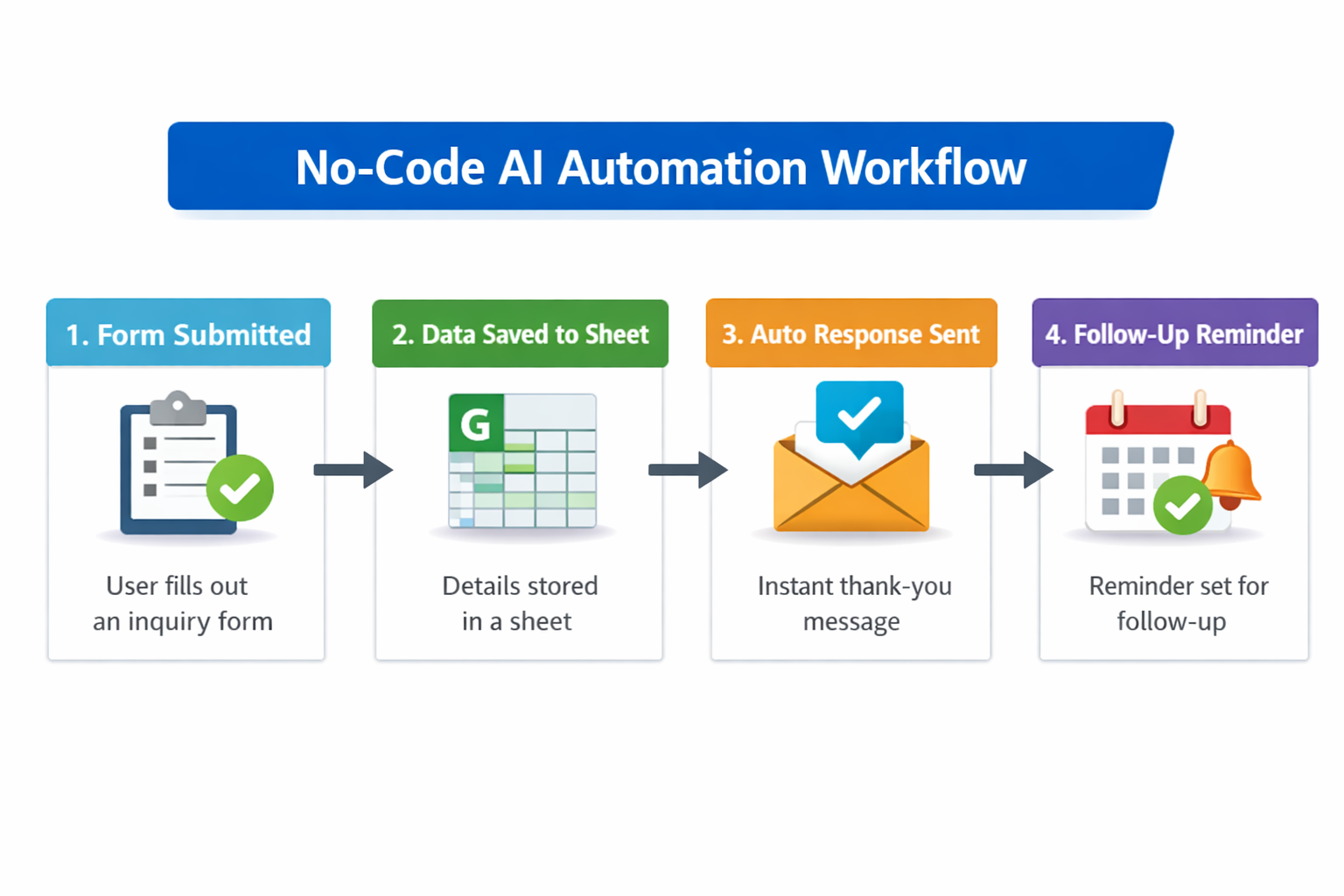
Example demo:
If a user submits a form, then:
- their details are saved in a sheet
- an instant thank-you message is sent
- a follow-up reminder is created
- the business owner receives a daily lead summary
Even this simple system can clearly show value to a client.
Why demo workflows matter:
- they help build your portfolio
- they increase confidence
- they make client calls easier
- they make your offer feel real
Step 6: How to Build a Portfolio Without Experience
One of the biggest beginner questions is: “If I do not have clients yet, how do I build a portfolio?”
The answer is simple: create sample systems.
You can build 3 sample workflows such as:
- a coaching lead capture automation
- a salon appointment reminder setup
- a content planning workflow for creators
For each sample, explain:
- what the problem was
- how the workflow works
- what result it is expected to produce
- how it benefits the business
You can include screenshots, process explanations, and before-and-after workflow comparisons. That gives you a real portfolio structure without making fake claims.
Step 7: How to Set Pricing
Pricing feels confusing for many beginners. If you charge too little, it may reduce trust. If you charge too much, it may become harder to close the deal. That is why result-based simple pricing works best.
Beginner pricing model:
- a small one-time setup fee
- an optional monthly support fee
Example structure:
- audit and setup
- workflow build
- testing and training
- optional maintenance
You can price your package based on workflow complexity:
- simple workflow
- moderate workflow
- multi-step workflow
Pricing logic:
If your setup saves the client 10 to 15 hours of manual work, then your service has clear value. Pricing should not depend only on time. It should also depend on the business outcome.
Step 8: How to Get Your First Client
Now comes the most practical part: finding clients.
For beginners, the best method is usually manual outreach. Fancy branding matters less than simple, clear messaging.
Where to do outreach:
- Instagram business pages
- local business listings
- Facebook business groups
- personal network
- WhatsApp referrals
What your outreach message should include:
- one specific observation about their business
- one clear problem
- one simple solution
- a soft call to action
Example outreach angle:
“Noticed that many businesses miss follow-ups when leads come from forms or messages. I help set up simple no-code systems so leads are captured, organized, and followed up faster. If useful, I can share a quick workflow idea for your business.”
This approach works better than spam because it is specific and easy to understand.
Step 9: What to Ask on a Client Call
If a client shows interest, do not keep the conversation random. Ask structured questions.
Important questions:
- what repetitive tasks are taking up your time each day?
- which work is consuming the most time?
- how are leads or inquiries being handled right now?
- who on the team manages that process?
- what is causing the biggest delays?
- what result are you hoping to achieve?
The goal of these questions is not to impress the client. The goal is to understand the problem clearly.
Step 10: Keep the Delivery Process Simple
A strong service business runs on delivery clarity. That is why every project should follow a simple process.
Suggested delivery flow:
- client discovery
- current process mapping
- workflow proposal
- setup
- testing
- revisions
- handover
- support
If you follow this structure, your work will feel more professional. It also gives the client confidence that you are organized.
Real Example: Automation Idea for a Local Coaching Business
Let’s say there is a coaching business where students fill out an inquiry form. The problem is that form submissions stay scattered, and follow-ups are not happening on time.
Manual process:
- a form comes in
- the team may or may not notice it
- callback gets delayed
- the lead goes cold
Automated process:
- the form response is automatically saved in a sheet
- an instant acknowledgment message is sent
- the admin gets notified
- a daily lead summary is generated
- follow-up status is tracked
Result:
- better response time
- fewer missed leads
- more organized team workload
- more clarity for the business owner
This is the most important point in the article: you are not selling “AI.” You are selling a better business process.
Common Mistakes Beginners Should Avoid
1. Offering a service that is too broad
When you offer everything, the client understands nothing clearly.
2. Focusing too much on tool features
Clients do not want a feature list. They want a result.
3. Not building a demo or sample
Without a sample, your service feels abstract.
4. Creating overcomplicated workflows
Simple systems are often more useful, especially for small businesses.
5. Not following up
Many clients do not respond to the first message. Professional follow-up matters.
6. Making fake claims
Only show what you have genuinely built, even if it is a sample system. Trust is a long-term asset.
30-Day Action Plan for Beginners
If you want to test this business seriously, follow this simple 30-day plan.
Week 1
- choose one niche
- list 3 business problems
- build 2 demo workflows
Week 2
- prepare a portfolio page or simple document
- draft your outreach message
- make a list of 20 potential clients
Week 3
- do outreach daily
- take calls with interested prospects
- refine your offer based on feedback
Week 4
- try to close your first small setup project
- document the process
- collect feedback or a testimonial
Consistency is the key here. A business does not become perfect in the first week. But with a clear offer and steady outreach, results start to come.
Final Conclusion
A no-code AI automation business is a practical opportunity in 2026, especially for people who want to build a service-based income without coding. Success in this business is not about just knowing AI tools. The real secret is:
- a clear niche
- one specific problem
- a result-based offer
- a simple demo
- consistent outreach
- professional delivery
If you are a beginner, do not make your first step, “I will start a full agency.” Make your first step this: one niche, one problem, one simple workflow.
That is what brings you closest to your first client. Note: This guide is written to help beginners understand no-code AI automation as a business model. The focus is on practical implementation so the article does not stay limited to theory alone.

How Businesses Can Prepare for an AI-First Future
Artificial Intelligence is no longer an emerging technology. It is quickly becoming the foundation